shep
Custom Worktree Provisioning
Every Shep feature runs in its own isolated git worktree under
~/.shep/repos/<repo-hash>/wt/<branch-slug>. By default Shep creates it with
git worktree add, which is a plain checkout — no node_modules, no untracked
.env, no build caches.
That is fine for most repositories and wrong for some:
- Monorepos that resolve dependencies from a single hoisted
node_modulesat the workspace root. A fresh worktree has none, and re-installing per feature is slow (or impossible offline). - Projects with native or path-sensitive tooling that only build from a prepared directory.
- Teams with an existing worktree tool — a script that already knows how to lay down a tree correctly for that repository.
Two settings cover these cases. Both live under Settings → Worktree in the
web UI and are persisted in settings.worktree.
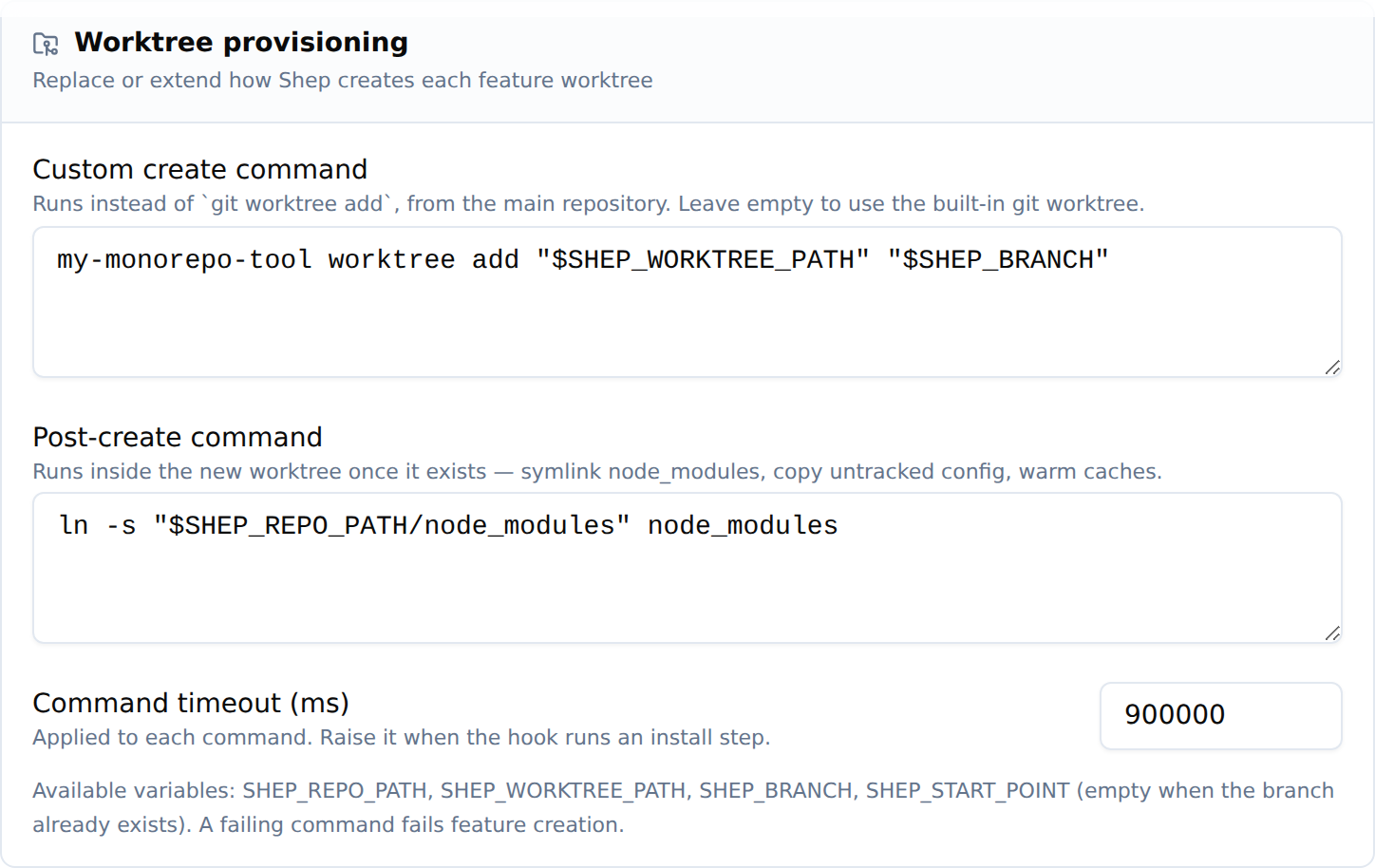
They are also configurable from the CLI with shep settings worktree — see
Configuring from the CLI below.
The two hooks
| Setting | Replaces git worktree add? |
Working directory | Typical use |
|---|---|---|---|
createCommand |
Yes | Main repository | Hand provisioning to your own tool |
postCreateCommand |
No — runs after | The new worktree | Symlink node_modules, copy config, warm caches |
Both are plain shell command lines. Shep runs them through the platform shell
(cmd.exe on Windows, the POSIX shell elsewhere), so pipes, &&, quoting, and
variable expansion all work.
Leaving both empty keeps the built-in git worktree add behaviour — this
feature is entirely opt-in.
Environment variables
Both commands receive the process environment plus:
| Variable | Value |
|---|---|
SHEP_REPO_PATH |
Absolute path of the main repository clone |
SHEP_WORKTREE_PATH |
Absolute path the worktree must exist at when the command finishes |
SHEP_BRANCH |
Branch that must be checked out in the worktree |
SHEP_START_POINT |
Start ref for a new branch; empty when the branch already exists |
SHEP_START_POINT is the signal that tells a createCommand which git
operation to perform: create the branch when it is set, check out the existing
branch when it is empty (this happens when Shep adopts an existing branch).
Examples
Symlink a hoisted node_modules (monorepo)
Leave createCommand empty and set:
ln -s "$SHEP_REPO_PATH/node_modules" node_modules
The command runs with the worktree as its working directory, so the relative
node_modules target lands inside the new tree.
For a pnpm workspace where each package has its own node_modules, link them
all:
for dir in packages/*; do
  [ -d "$SHEP_REPO_PATH/$dir/node_modules" ] && ln -s "$SHEP_REPO_PATH/$dir/node_modules" "$dir/node_modules"
done
ln -s "$SHEP_REPO_PATH/node_modules" node_modules
Copy untracked local config
cp "$SHEP_REPO_PATH/.env.local" . 2>/dev/null || true
Hand provisioning to your own tool
my-monorepo-tool worktree add "$SHEP_WORKTREE_PATH" "$SHEP_BRANCH" ${SHEP_START_POINT:+--from "$SHEP_START_POINT"}
A createCommand must leave a usable checkout at $SHEP_WORKTREE_PATH. Shep
verifies the directory exists and then looks the tree up in
git worktree list; if your tool produced something git does not register as a
worktree of the main repository (a shared clone, for example), Shep falls back
to inspecting the directory directly rather than failing.
Prefer wrapping git worktree add inside your tool where you can — shep
removes worktrees with git worktree remove, which only works for real
worktrees.
Configuring from the CLI
Everything the Settings page does is available headless:
shep settings worktree                                  # show current config
shep settings worktree --post-create-command '<cmd>'    # run <cmd> in each new worktree
shep settings worktree --create-command '<cmd>'         # replace `git worktree add`
shep settings worktree --timeout 900000                 # per-command timeout
shep settings worktree --clear                          # back to the built-in flow
Passing an empty string to either command flag clears just that command.
Timeout and failure behaviour
commandTimeoutMs (default 300000 — 5 minutes) applies to each command
separately. Raise it if your hook runs an install step.
A failing command fails feature creation. This is deliberate: a worktree whose setup did not complete produces confusing agent failures much later. The error surfaced to the user carries the command, its exit message, and the first 2000 characters of its combined stdout/stderr.
Related
- configuration.md — all other settings
tsp/domain/entities/settings.tsp—WorktreeConfigmodel